How to choose a sublimation printer for T-shirts from the dyeing side: print width, colour accuracy, ink cost and upkeep, with four printers sold on Amazon compared.
At a glance
8.5 inusual desktop width
10–12 intypical adult front print
CMYKdisperse dye inks
4printers compared
Affiliate disclosure: some links in this guide are Amazon affiliate links. As an Amazon Associate, Dyeing Solution earns from qualifying purchases, at no extra cost to you. The printers were chosen on their published specifications and independent reviews; we have not tested them ourselves. See our editorial policy.
The best sublimation printer for T-shirts depends on one thing most guides skip: how wide your designs are. Most desktop sublimation printers print up to 8.5 inches wide, which suits small and medium designs but not a full adult chest print. After print width, what matters is colour accuracy, the cost of ink over time, and how easy the printer is to keep running. This guide explains each point from the dyeing side, then compares four printers sold on Amazon.
Quick picks, explained in full below:
- Best for beginners and best value: Epson SureColor F170.
- Best colour accuracy and support: Sawgrass SG500.
- Easiest app-based option: Brother SP1.
- Best for large shirt prints: Epson SureColor F570 Pro (24 inches wide).

- Confidence - Epson authorized partner. Original Epson Manufactured product delivered in Epson’s factory-sealed packaging with Epson documentation and Epson’s full manufacturer warranty.
- Genuine Epson Ink Included - Comes with a full set of OEM Epson sublimation inks, certified ECO PASSPORT by OEKO-TEX for safe use on textiles, apparel, mugs, mousepads, and more.
- Astounding Print Quality - Epson's Surecolor F170 Sublimation printer boasts the PrecisionCore printhead which offers Precision Droplet Control for the most outstanding image clarity on the market. Included in the printer bundle: full set of Epson sublimation ink, user guide, AC power cable.
- Versatile Media Support - Includes a 150-sheet auto-feed tray for added efficiency. Epson SureColor sublimation printers house the paper in a dust resistant closed tray for the cleanest possible prints with less paper prep for professional sublimation transfers.
- Compact Reliable Solution - Space-saving design with user-friendly setup for MacOS & Windows. Please note that connection to mobile devices is not supported with this printer. Includes ink bottles with auto-stop technology for clean, mess-free refills. Perfect for hobbyists, crafters, and small business owners.

- Professional-Grade Print Quality: The Sawgrass SG500 delivers professional-grade sublimation printing, perfect for creating custom t-shirts, drinkware, signage, and promotional products; Ideal for small businesses and home-based entrepreneurs who demand vibrant, high-definition results
- Rich & Vivid CMYK Sublimation Printing Inkset: Includes a full starter set of 20ml SubliJet UHD ink cartridges (cyan, magenta, yellow, black), specially formulated in small batches to produce rich, consistent colors on both hard and soft substrates, ensuring every project stands out with vivid, sharp detail
- Compact Design with Big Potential: The SG500 offers desktop-friendly dimensions without compromising performance, printing on media up to 8.5” x 14”; This makes it perfect for small to medium-sized projects, while maintaining a high level of efficiency for busy businesses; if larger prints are needed, you can also use the bypass tray to fit prints up to 8.5" x 51"
- Powerful, User-Friendly Software: Gain access to our all-in-one MySawgrass platform, an intuitive online design tool packed with templates, allowing you to create stunning sublimation printed products with ease; Paired with Sawgrass Print Utility, you get precise color accuracy with Smart preset features and control over your printing process
- Built for Growth and Reliability: With features like Wi-Fi connectivity and print head auto-maintenance, the SG500 is engineered for durability and long-term use; Whether you're a hobbyist, entrepreneur, or scaling your business, this printer is designed to grow with you, providing superior reliability and support every step of the way

- 𝗧𝗵𝗶𝘀 𝘀𝗵𝗶𝗽𝗺𝗲𝗻𝘁 𝘀𝗵𝗶𝗽𝘀 𝗟𝗧𝗟 𝗳𝗿𝗲𝗶𝗴𝗵𝘁 𝗼𝗻𝗹𝘆 𝗮𝗻𝗱 𝘄𝗶𝗹𝗹 𝗿𝗲𝗾𝘂𝗶𝗿𝗲 𝗮 𝘃𝗮𝗹𝗶𝗱 𝗽𝗵𝗼𝗻𝗲 𝗻𝘂𝗺𝗯𝗲𝗿 𝘁𝗼 𝘀𝗰𝗵𝗲𝗱𝘂𝗹𝗲 𝗱𝗲𝗹𝗶𝘃𝗲𝗿𝘆.
- Astounding Print Quality - PrecisionCore MicroTFP printhead offers Precision Droplet Control for outstanding clarity, plus reliability with Nozzle Verification Technology.
- Versatile Media Support - Accommodates rolls and sheets up to 24" wide; includes a 50-sheet auto-feed tray and built-in cutter for added efficiency.
- Professional Software - Epson Edge Print Pro with an Adobe PostScript 3 and Adobe PDF Print Engine features job layout and nesting, pattern repeats, and advanced color controls for professional results
- Compatibility - The T49M inks are engineered to work seamlessly with Epson SureColor printers, ensuring optimal performance and reliability. The inks are compatible with various media types, including polyester fabrics, coated ceramics, and more.
What a sublimation printer really prints
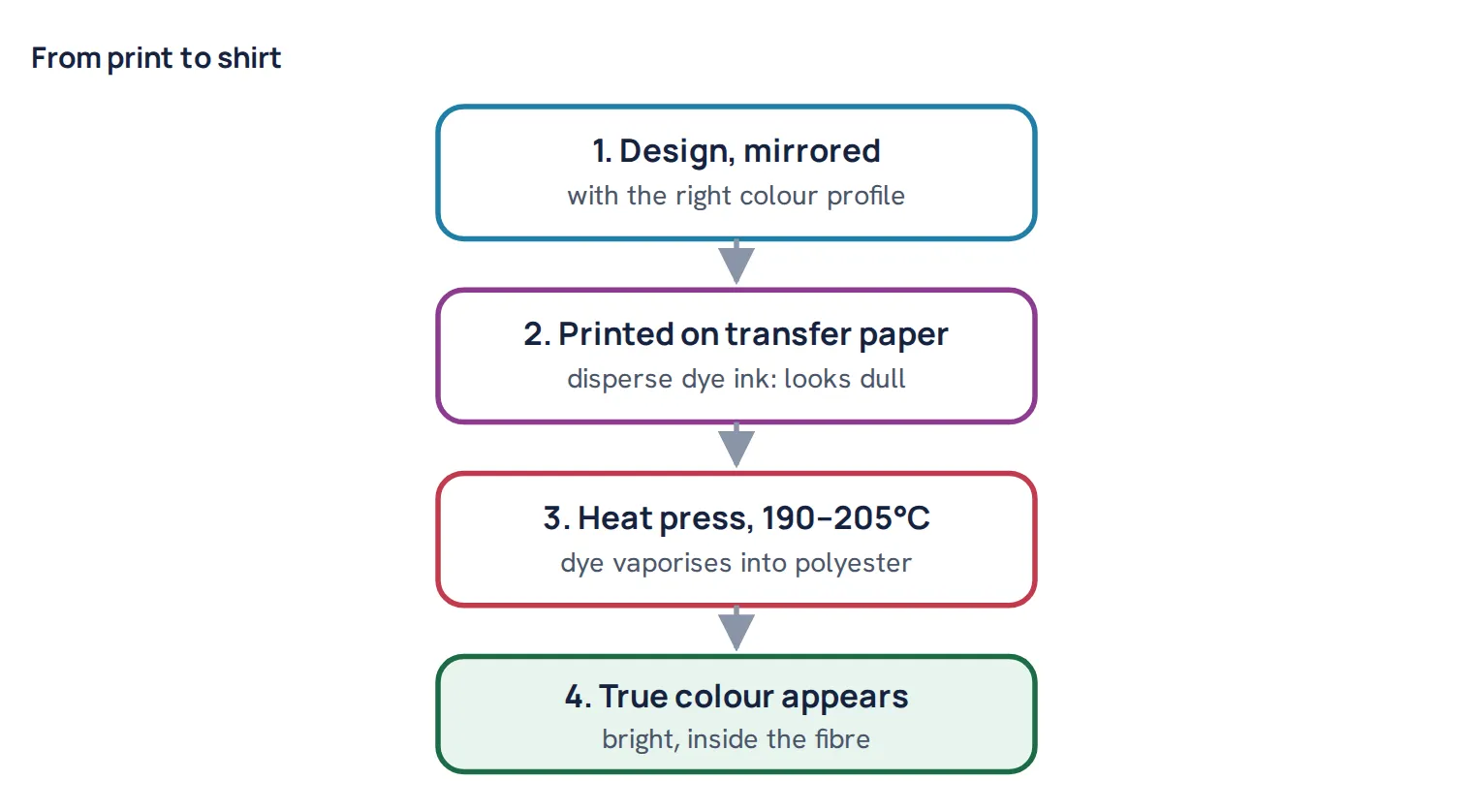
Sublimation ink is not normal printer ink. It is a mixture of disperse dyes, the same dye class we use to dye polyester fabric in the dye house, in cyan, magenta, yellow and black. The printer puts the dye on special transfer paper; a heat press then turns it to vapour at around 190–205°C (375–400°F) and drives it into the polyester shirt.
Two things follow from that chemistry. First, the print on paper looks dull and pale; the true colour only appears after pressing, when the dye enters the fibre. Do not judge colour from the paper. Second, the result can only be as good as the polyester in the shirt: disperse dye has no affinity for cotton. For the full explanation, see reactive vs disperse dye.
How to choose a sublimation printer for T-shirts
1. Print width: the limit most people hit first
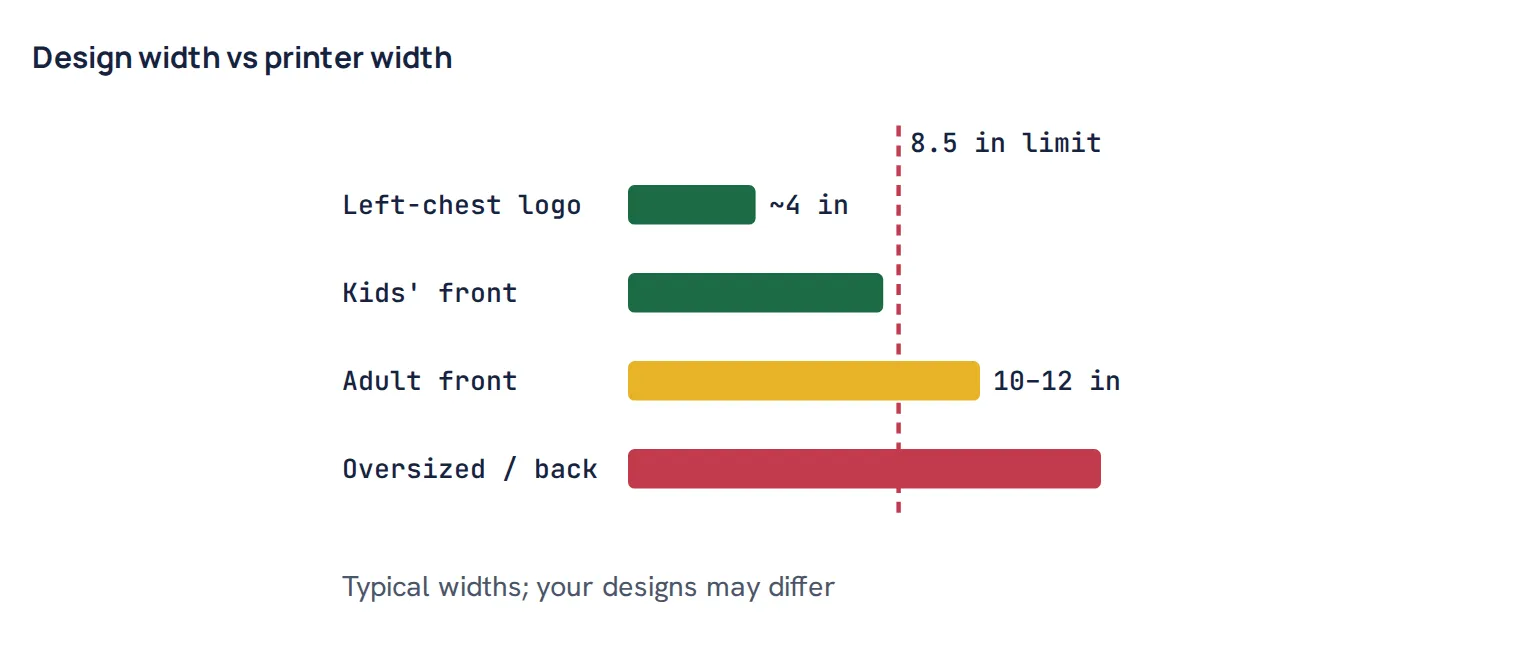
Desktop sublimation printers usually print up to 8.5 inches wide (about 22 cm). That is enough for children’s shirts, left-chest logos and many medium designs. A full adult front print is often 10 to 12 inches wide or more, which needs a wider printer. If most of your orders are large chest or back prints, buy the width you need now; it is the one thing you cannot upgrade later.
2. Colour accuracy and colour profiles
A sublimation colour is mixed from four dyes, exactly like a dye recipe. If the balance is off, greys turn greenish or brownish and skin tones shift, the same problem we solve in shade matching. Good results need an ICC colour profile made for your printer, ink, paper and blank together. Printers that come with ready-made profiles for many combinations save a lot of trial and error. Like a dyed shade, a print can also look different under shop lights and daylight; see colour measurement and metamerism.
3. Ink cost over time
The printer price is a one-time cost; ink is forever. Printers that use refillable ink bottles are usually much cheaper to run than printers with small cartridges. If you plan to print every week, compare the price per millilitre of ink, not just the printer price.
4. Keeping it running
Disperse dye ink can dry in the print head if the printer sits unused. Print a small test page every few days, keep the printer away from heat and direct sun, and follow the maker’s cleaning routine. A printer with good support and a long warranty is worth more if you depend on it for orders.
5. Genuine sublimation printer or a converted inkjet?
Many people convert an ordinary refillable inkjet printer to sublimation ink because it is cheap. It can work, but the conversion normally voids the printer maker’s warranty, you get no colour support, and you must build your own profiles. For a business that depends on consistent colour, a printer made for sublimation is the safer choice.
Common mistake: judging the colour from the printed paper and turning up saturation to make it look brighter. The paper always looks dull; after pressing, the boosted colours come out too strong and greys shift. Judge colour only on a pressed test shirt, under daylight.
The four best sublimation printers for T-shirts
Epson SureColor F170: best for beginners and best value
- Confidence - Epson authorized partner. Original Epson Manufactured product delivered in Epson’s factory-sealed packaging with Epson documentation and Epson’s full manufacturer warranty.
- Genuine Epson Ink Included - Comes with a full set of OEM Epson sublimation inks, certified ECO PASSPORT by OEKO-TEX for safe use on textiles, apparel, mugs, mousepads, and more.
- Astounding Print Quality - Epson's Surecolor F170 Sublimation printer boasts the PrecisionCore printhead which offers Precision Droplet Control for the most outstanding image clarity on the market. Included in the printer bundle: full set of Epson sublimation ink, user guide, AC power cable.
- Versatile Media Support - Includes a 150-sheet auto-feed tray for added efficiency. Epson SureColor sublimation printers house the paper in a dust resistant closed tray for the cleanest possible prints with less paper prep for professional sublimation transfers.
- Compact Reliable Solution - Space-saving design with user-friendly setup for MacOS & Windows. Please note that connection to mobile devices is not supported with this printer. Includes ink bottles with auto-stop technology for clean, mess-free refills. Perfect for hobbyists, crafters, and small business owners.
Epson’s desktop printer made only for sublimation. It prints up to 8.5 × 14 inches, has a 150-sheet auto-feed tray, connects by USB, Ethernet or Wi-Fi, and uses refillable 140 mL ink bottles, which keeps running costs low. It comes with a full set of Epson sublimation ink. An independent review in October 2026 reported consistently sharp, vibrant results and a rating of about 4.5 stars from more than 490 Amazon reviews.
- Why it fits T-shirts: low ink cost and a simple setup for small to medium designs.
- Keep in mind: 8.5 inches is the maximum width. It prints sublimation only, not normal documents. Some owners report unreliable Wi-Fi and greys shifting green or brown until colour settings are tuned.
Check the Epson SureColor F170 on Amazon →
Sawgrass SG500: best colour accuracy and support
- Professional-Grade Print Quality: The Sawgrass SG500 delivers professional-grade sublimation printing, perfect for creating custom t-shirts, drinkware, signage, and promotional products; Ideal for small businesses and home-based entrepreneurs who demand vibrant, high-definition results
- Rich & Vivid CMYK Sublimation Printing Inkset: Includes a full starter set of 20ml SubliJet UHD ink cartridges (cyan, magenta, yellow, black), specially formulated in small batches to produce rich, consistent colors on both hard and soft substrates, ensuring every project stands out with vivid, sharp detail
- Compact Design with Big Potential: The SG500 offers desktop-friendly dimensions without compromising performance, printing on media up to 8.5” x 14”; This makes it perfect for small to medium-sized projects, while maintaining a high level of efficiency for busy businesses; if larger prints are needed, you can also use the bypass tray to fit prints up to 8.5" x 51"
- Powerful, User-Friendly Software: Gain access to our all-in-one MySawgrass platform, an intuitive online design tool packed with templates, allowing you to create stunning sublimation printed products with ease; Paired with Sawgrass Print Utility, you get precise color accuracy with Smart preset features and control over your printing process
- Built for Growth and Reliability: With features like Wi-Fi connectivity and print head auto-maintenance, the SG500 is engineered for durability and long-term use; Whether you're a hobbyist, entrepreneur, or scaling your business, this printer is designed to grow with you, providing superior reliability and support every step of the way
A desktop sublimation printer built around colour management. It prints 8.5 × 14 inches from the main tray, or up to 8.5 × 51 inches with an optional bypass tray, at up to 4880 × 1200 dpi. Sawgrass provides colour profiles for 124 combinations of paper, ink and blank, and its colour is G7 certified. It connects by USB, Ethernet or Wi-Fi and has a 3-year or 100,000-print warranty with lifetime technical support.
- Why it fits T-shirts: ready-made profiles mean accurate colour with less testing, which matters when customers expect a logo colour to match.
- Keep in mind: it uses ink cartridges, which cost more per millilitre than bottles. The same 8.5-inch width limit applies. It is usually sold in bundles with ink and paper.
Check the Sawgrass SG500 bundle on Amazon →
Brother SP1: easiest app-based option
No products found.
Brother’s sublimation printer is designed around its Artspira app: you create or pick a design on your phone or tablet and send it to the printer wirelessly, with more than 100 free sublimation designs included. It comes with four 47 mL ink cartridges and 10 sheets of sublimation paper, so you can start straight away, and has a 2-year limited warranty.
- Why it fits T-shirts: the simplest start for crafters who design on a phone and do not want to learn colour profiles.
- Keep in mind: it relies on cartridges and on the app workflow. Check the maximum print size on the product page against your designs before buying. A heat press is needed and sold separately.
Check the Brother SP1 on Amazon →
Epson SureColor F570 Pro: best for large shirt prints
- 𝗧𝗵𝗶𝘀 𝘀𝗵𝗶𝗽𝗺𝗲𝗻𝘁 𝘀𝗵𝗶𝗽𝘀 𝗟𝗧𝗟 𝗳𝗿𝗲𝗶𝗴𝗵𝘁 𝗼𝗻𝗹𝘆 𝗮𝗻𝗱 𝘄𝗶𝗹𝗹 𝗿𝗲𝗾𝘂𝗶𝗿𝗲 𝗮 𝘃𝗮𝗹𝗶𝗱 𝗽𝗵𝗼𝗻𝗲 𝗻𝘂𝗺𝗯𝗲𝗿 𝘁𝗼 𝘀𝗰𝗵𝗲𝗱𝘂𝗹𝗲 𝗱𝗲𝗹𝗶𝘃𝗲𝗿𝘆.
- Astounding Print Quality - PrecisionCore MicroTFP printhead offers Precision Droplet Control for outstanding clarity, plus reliability with Nozzle Verification Technology.
- Versatile Media Support - Accommodates rolls and sheets up to 24" wide; includes a 50-sheet auto-feed tray and built-in cutter for added efficiency.
- Professional Software - Epson Edge Print Pro with an Adobe PostScript 3 and Adobe PDF Print Engine features job layout and nesting, pattern repeats, and advanced color controls for professional results
- Compatibility - The T49M inks are engineered to work seamlessly with Epson SureColor printers, ensuring optimal performance and reliability. The inks are compatible with various media types, including polyester fabrics, coated ceramics, and more.
A 24-inch wide desktop sublimation printer that takes rolls and sheets, with a built-in cutter and a 50-sheet auto-feed tray. It uses Epson’s PrecisionCore print head with nozzle checking, connects by USB, Ethernet or Wi-Fi, and comes with two full sets of 140 mL ink bottles.
- Why it fits T-shirts: it is the only printer here that prints a full adult front, back or oversized design in one piece.
- Keep in mind: it is a business machine at a much higher price, and it needs more space. Buy it when large prints are a regular part of your orders.
Check the Epson SureColor F570 Pro on Amazon →
Comparison at a glance
| Printer | Max width | Ink | Colour help | Warranty | Price level |
|---|---|---|---|---|---|
| Epson F170 | 8.5 in | 140 mL bottles | Basic | 1 year | Entry |
| Sawgrass SG500 | 8.5 in | Cartridges | 124 ready profiles | 3 years | Mid-range |
| Brother SP1 | See product page | 47 mL cartridges | App-based | 2 years | Entry to mid |
| Epson F570 Pro | 24 in | 140 mL bottles | Basic | See product page | Professional |
Your first test print
- Print a colour chart with solid cyan, magenta, yellow, black, a neutral grey and a skin tone, mirrored, using the profile for your paper.
- Press it on the shirt you will sell, at the settings from your paper maker, typically around 190–200°C (375–400°F) for 45–60 seconds.
- Look at it in daylight, not only under shop lights. A grey that leans green or brown means the profile or settings need adjusting, not the press.
- Wash it once at 40°C and look again. A big change means low polyester content in the shirt.
Worked example. A new shop buys an 8.5-inch printer for adult team shirts and finds the 11-inch front design will not fit, so every design has to be shrunk. The printer works well for their logos and kids’ shirts, but for the main product a 24-inch printer would have been the right first buy. Measure your three most common designs before choosing.
Summary
- Sublimation ink is disperse dye; colour develops in the heat press, so paper prints always look dull.
- Check print width first: 8.5-inch printers suit logos and smaller designs; full adult prints need a wider printer.
- Colour profiles and ink cost matter more over time than the printer price.
- A printer made for sublimation is safer for a business than a converted inkjet.
- Our picks: Epson F170 (beginners and value), Sawgrass SG500 (colour and support), Brother SP1 (app-based) and Epson F570 Pro (large prints).
Questions
What is the best sublimation printer for T-shirts for beginners?
A printer made for sublimation with refillable ink bottles and a simple setup, such as the Epson SureColor F170, is the easiest low-cost start for small and medium designs.
Can a sublimation printer print a full-size T-shirt design?
Most desktop sublimation printers print up to 8.5 inches wide, which is too narrow for many adult front prints. For full front, back or oversized designs you need a wider printer, such as a 24-inch model.
Why does my sublimation print look dull on the paper?
Sublimation ink is disperse dye, and its colour only develops when the heat press drives it into polyester. A dull print on paper is normal; judge colour on the pressed shirt.
Can I convert a regular printer to sublimation?
Many people convert refillable inkjet printers, but this usually voids the maker’s warranty and you must manage colour profiles yourself. For a business, a printer made for sublimation is safer.
Do sublimation printers work on cotton shirts?
No. The printer works, but disperse dye does not bond to cotton, so the print fades or washes out. Use white or light shirts with high polyester content.

Textile engineer with 14+ years in dyeing and fabric development. He writes every guide on Dyeing Solution from real production work. Full profile